3x-ui: VLESS + Reality step by step
Reality is what keeps your inbound alive under DPI in 2026. In 3x-ui it's pleasant to build: the panel generates the keys itself and can hunt for a live donor. Below is a step-by-step through the connection-creation form, with a breakdown of each field and one warning that will save you an evening. Enter your own values in the builder above.
Why Reality and not plain TLS
Classic VLESS+TLS gets flagged instantly: a fresh Let's Encrypt cert on some obscure domain, DPI sees a rare SNI and breaks the handshake. Reality solves this differently — it doesn't stand up its own TLS at all. It presents itself as someone else's big site (the donor) and reuses that site's real certificate. From the outside it's indistinguishable from you visiting a major HTTPS site.
The key idea: the donor is someone else's live resource with TLS 1.3 that nobody would object to. Not your domain. Your domain plays no part here at all. The good news: in 3x-ui the panel does almost all of this for you.
Step 1 — creating the connection
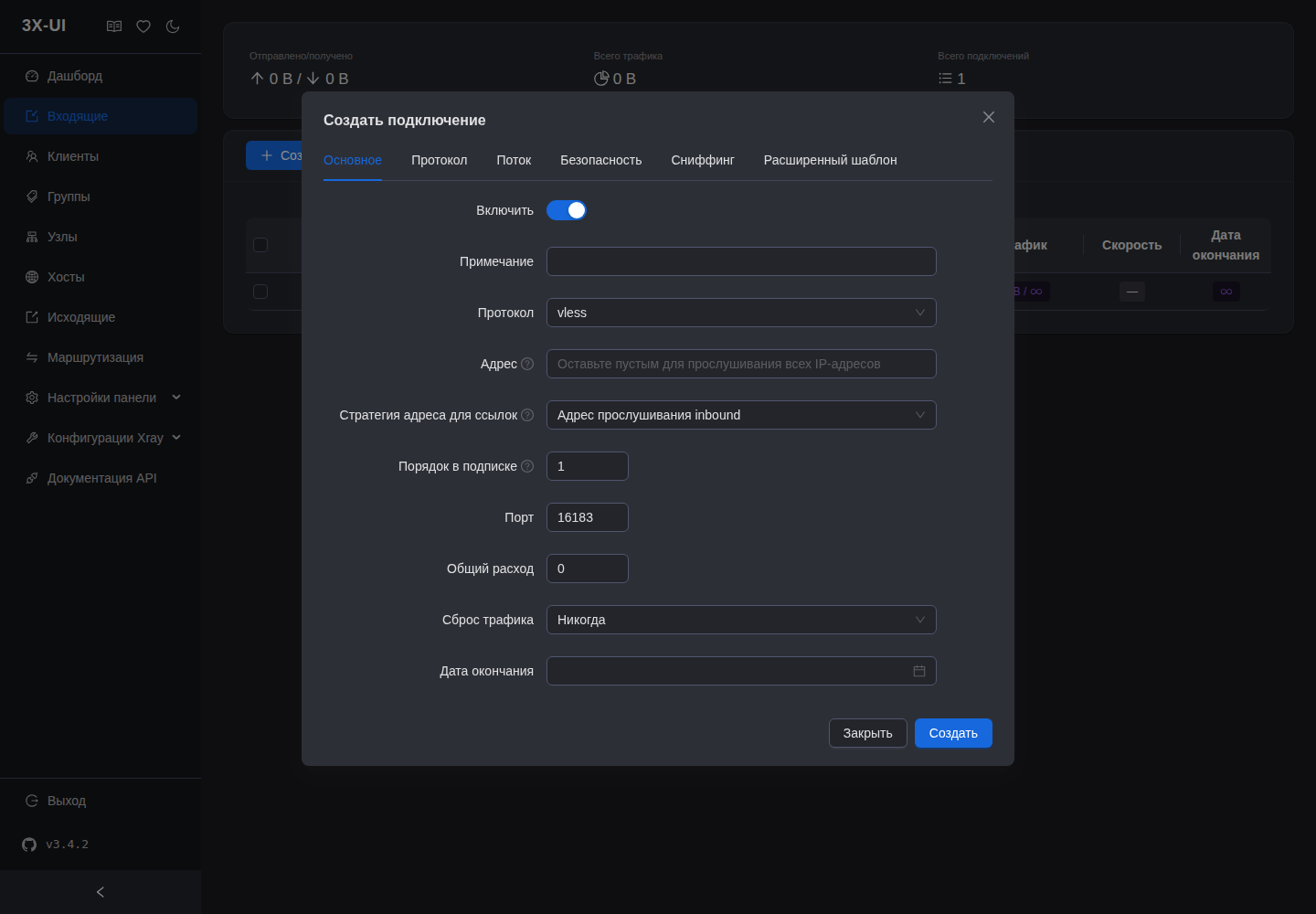
Open Inbounds → "Add Inbound". The form is split into tabs: General / Protocol / Transmission / Security / Sniffing / Advanced template. We'll go through the ones needed for Reality.
On the General tab:
- Remark — the inbound's label, for example
DE-01 · Reality. - Port —
443. This matters: 443 is the most inconspicuous port, that's where the whole HTTPS world lives. - Protocol —
vless.
Step 2 — the Security tab and auto-keys
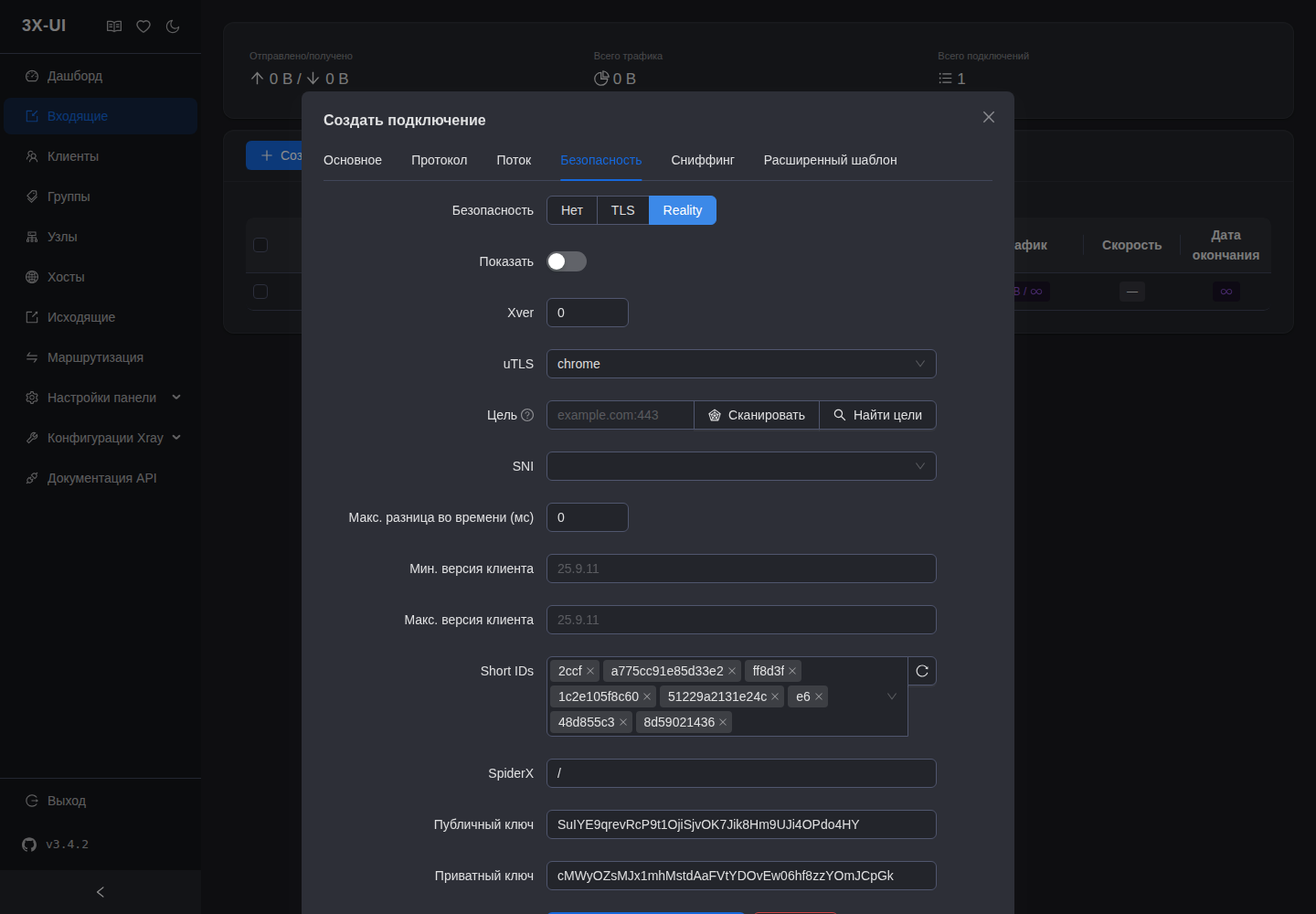
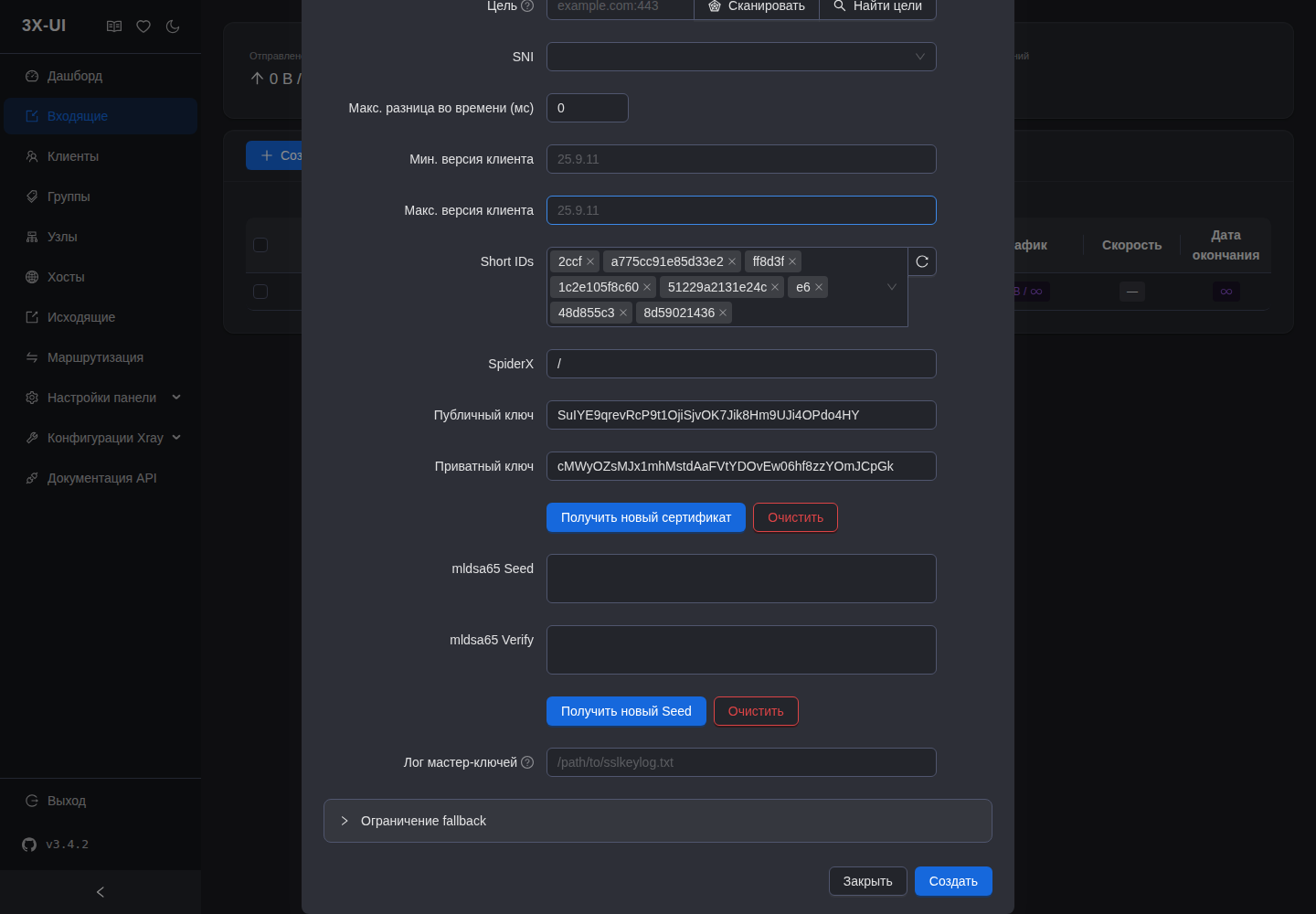
Move to the Security tab. There's a switch here: None / TLS / Reality. You pick Reality — and the panel immediately generates a key pair itself: the "Public key" and "Private key" fields are already filled in. You don't need to generate anything in the terminal.
- The "Get new certificate" button — if you want a new key pair, press it.
- The private key stays on the server (in the inbound config).
- The public key goes to the client in the subscription — the panel inserts it itself.
- Short IDs the panel fills in automatically, no need to touch them.
- The mldsa65 Seed / Verify fields (new in Xray 26.x) — you can leave them alone, they aren't needed for basic Reality.
Step 3 — the donor (Target + SNI), and the main warning
The donor is set right here on the Security tab — two linked fields:
- "Target" (dest/target) — where Reality proxies the "facade". Format
domain:443. - SNI — the name you masquerade as; it's the donor's domain without the port.
The panel helps: the "Scan" / "Find targets" buttons pick a live dest holding TLS 1.3 and insert it themselves. But don't pick blindly — here's the critical part:
⭐ Verified live e2e: on Xray 26.x the donor
www.microsoft.comBREAKS Reality. The inbound gets created but the tunnel won't come up. Takewww.cloudflare.com— with it Reality comes up stably. This is the first thing to check when "I set everything up and it still won't connect".
So, on the donor:
Target (dest) : www.cloudflare.com:443
SNI         : www.cloudflare.com
uTLS        : chrome
Short IDs : (auto — don't touch)- uTLS leave as
chrome— this is the TLS client fingerprint. If the chrome fingerprint specifically starts getting throttled in your region — switch tofirefox, it often helps ride out the wave. - Target and SNI must point to the same donor (
www.cloudflare.com).
Step 4 — the Vision flow on the Transmission tab
Reality over TCP wants Vision mode. Go to the Transmission tab, where network = tcp, and in the client flow set:
network : tcp
flow    : xtls-rprx-vision
xtls-rprx-vision removes the TLS-in-TLS double encryption and breaks statistical packet-length analysis. On TCP-Reality this is the mandatory minimum. Flow is set on the client — when you add a user to this inbound, their flow must also be set to xtls-rprx-vision.
Leave the Sniffing tab enabled (destOverride on http/tls/quic) — that's the standard. You don't touch the Advanced template for basic Reality.
Save the connection. The panel assembles the Xray config and restarts the core itself.
Step 5 — what this looks like in the config
Under the hood the panel assembles an inbound like this. You don't have to look at it by hand (and don't edit it directly — the panel will overwrite it), but it's useful to understand what's happening:
{
  "port": 443,
  "protocol": "vless",
  "settings": {
    "clients": [
      { "id": "CLIENT_UUID", "flow": "xtls-rprx-vision" }
    ],
    "decryption": "none"
  },
  "streamSettings": {
    "network": "tcp",
    "security": "reality",
    "realitySettings": {
      "show": false,
      "dest": "www.cloudflare.com:443",
      "serverNames": ["www.cloudflare.com"],
      "privateKey": "PRIVATE_KEY_X25519",
      "shortIds": ["REALITY_SHORT_ID"]
    }
  }
}
You can see that dest and serverNames are that same donor and match, privateKey is from the panel's auto-pair, and publicKey (not present here) the panel hands to the client in the subscription.
Verification
Open the port and connect with a client:
ufw allow 443/tcp

# from a device under the VPN — it should show the server IP
curl -s https://api.ipify.org
The server IP came back — Reality assembled, the chain is live. If it hangs and won't connect — check in order: (1) the donor is not www.microsoft.com but www.cloudflare.com; (2) on the client flow = xtls-rprx-vision; (3) 443 is open in the firewall; (4) the client's public key matches the private key on the server (if you changed the pair with the button — re-hand the subscription).
Reality is the foundation. From there you can layer XHTTP over Reality or gRPC as a hidden fallback — that's in the neighboring write-ups of the "protocols" branch.
Next guide 3x-ui: XHTTP over Reality → ↗ Article unclear or something off? Message me and I will help or fix it. @notrealvpn →